Slow Roads
📖 About the Game
What Is Slow Roads?
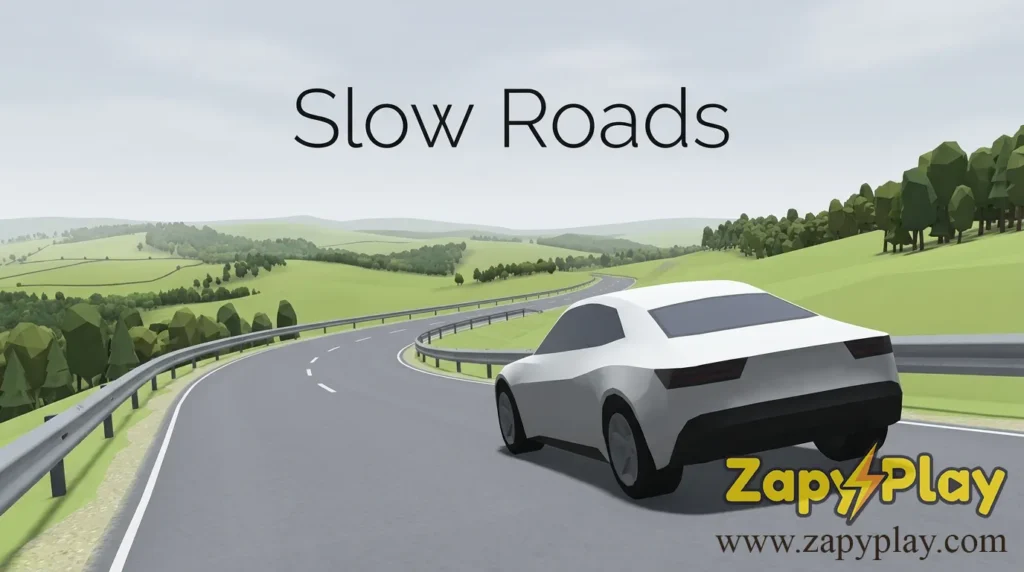
Slow Roads is a minimalist, procedurally generated endless driving game that runs entirely in your browser — no download required. The core gameplay loop is deceptively simple: you pick a vehicle, choose a scenic environment, and drive endlessly along winding roads while soaking in calming, low-poly landscapes. What sets slow roads apart from every other arcade racer is its deliberate design philosophy — it is built for relaxation, not competition.
Developed by Noah Panter, the game launched as a passion project and quickly became a viral sensation for its meditative quality. Each session generates a unique world using a seed-based system, meaning no two drives are ever identical. The result is an experience that feels alive and constantly moving, even when you choose to cruise at a gentle pace.
Unlike traditional arcade racers that push you to go faster and beat the clock, this game invites you to slow down. That contrast alone is what made slow roads io earn a dedicated global following almost overnight.
Why You’ll Love Playing Slow Roads Online
Top Benefits of Playing Online
One of the biggest draws of slow roads unblocked is that you can play it directly in your browser without any barriers. There is no sign-up wall, no payment gate, and no installation process. Whether you are on a school computer, a work laptop, or a home desktop, the game is accessible and ready to go in seconds.
The online version is also fully optimized for both desktop and mobile, meaning you can enjoy a quick trip during a lunch break or a long evening session from your couch. Cross-platform support is seamless — the experience on a tablet feels just as polished as on a widescreen monitor. This kind of accessibility is rare even among premium browser titles.
Playing slow roads online also means the game is always up to date. There is no outdated version sitting on your hard drive, and you never have to worry about a patch or code update breaking your save. Every time you load it, you get the current, best build of the game.
Game Features
Key Features & Mechanics
- Procedural Seed Generation: Every road is generated from a unique seed, so each drive through a rocky canyon or rolling countryside feels genuinely fresh. You can even share your seed with friends so they can experience the exact same route.
- Multiple Vehicle Options: You can drive a standard car, ride a bike, or pilot other vehicle types, each handling differently on the winding tarmac. The bike option in particular adds a fun layer of challenge since it tips more easily on sharp curves.
- Relaxation-First Design: Unlike most arcade games, there is no traffic, no timer, and no rage-inducing fail state. The absence of construction zones and oncoming lane hazards is a conscious design choice that keeps the mood calm.
- Environment Variety: From lush green countryside to arid rocky terrain, the game churns out diverse biomes that keep long sessions visually interesting. The low-poly art style ages beautifully and loads fast even on older hardware.
- Zero Download, Instant Play: The game runs entirely in-browser with no mobile app to download, making it one of the most accessible driving experiences online. It works on both iOS and Android browsers without any performance compromise.
- Autopilot Mode: A built-in autopilot feature lets the game drive for you — perfect if you want to use it as a screensaver or simply watch the scenery in motion. This is the feature that made the game go viral on social media.
- Custom Speed Control: Players can set their own speed from an easy crawl to a fast clip, giving full control over the intensity of each session.
How Slow Roads Compares to Similar Arcade Games
Genre Comparisons & Differences
Most endless driving games are built around speed, obstacle avoidance, and score-chasing. Slow roads flips that formula entirely. Where a typical arcade racer might ask you to weave through traffic at breakneck pace, this title asks you to simply take in the scenery — and that distinction is what makes it remarkable.
Compared to other browser-based driving games that lean on construction hazards, lane-switching mechanics, and vehicle upgrades, slow roads io strips everything back to the purest form of driving. There is no currency to earn, no king-of-the-leaderboard pressure, and no aggressive monetization. It is closer in spirit to a digital zen garden than a traditional racer.
For players who love the side of gaming that prioritizes atmosphere over adrenaline, this game sits in a category almost entirely its own. It draws loose comparisons to walking simulators on PC but delivers that same contemplative quality in a two-minute browser session — a feat very few games in any category can claim.
Game Modes
Free Drive Mode
Free Drive is the default mode and the heart of the slow roads game experience. You select your environment, pick your vehicle — whether that is a car, a bike, or another option — and simply drive with no objective other than to enjoy the journey. The road ahead is always procedurally generated, so you never know what scenic overlook or rocky ridge is coming next.
This mode is ideal for unwinding after a long day. Set your speed, turn on some background music — maybe something calm, not piano-bar loud — and let the world scroll by. There is no pressure, no mark to hit, and no timer counting down.
Autopilot Mode
Autopilot lets the game take the wheel while you watch the landscape in motion. It is surprisingly engaging as a passive experience, and many players use it as a moving desktop background during video calls or while they cook, study, or handle other tasks. A scholar once described it in an essay about digital mindfulness as the best example of passive interactive media in the browser space.
Even in autopilot, you can adjust speed and environment on the fly. The transition between biomes is smooth, and the game handles the steering so cleanly that you would almost forget a simple algorithm is doing all the work.
Challenge Mode
For players who want a bit more structure, Challenge Mode introduces a time-based or distance-based objective. You must drive a set distance without going off-road, which sounds easy but becomes genuinely tricky at fast speeds on winding rocky terrain. This mode gives the game a second layer of replayability for players who have mastered the meditative side and want something to chase.
The country roads in Challenge Mode tend to be narrower and more unpredictable than in Free Drive. One wrong turn and you are back to the start — a small dose of the classic arcade mentality injected into an otherwise serene experience.
Tips & Tricks to Win at Slow Roads
Proven Strategies & Pro Tips
- Learn the curve ahead early: The camera gives you a clear view of the road ahead, so always read the bend before you reach it. If you spot a sharp turn coming, ease off the speed now rather than correcting in a panic — this is especially critical when you drive a bike, which tips far more easily than a car.
- Use autopilot to learn optimal lines: Let the autopilot drive a lap and watch how it takes corners — it follows a near-perfect racing line through every curve. Once you understand the pattern, switch back to manual and replicate those smooth arcs to maintain momentum without drifting off the lane.
- Experiment with the seed system: If you find a route you love, note the seed code displayed at the start of your session. You can re-enter that code later to revisit the same world, which is great for practicing a particularly tricky stretch of rocky road that keeps breaking your runs in Challenge Mode.
- Match your speed to the environment: Rocky, hilly biomes have tighter turns than open countryside roads — going fast on a mountain road is a recipe for a frustrating run. Drop your pace on technical terrain and only push the speed when you are on a long, straight country stretch where you can see far enough to react.
- Use the side view for immersion, not precision: The side camera angle is beautiful but makes it harder to judge distance on curves. For serious runs in Challenge Mode, stick to the default forward-facing view so you can spot the road marking and edge clearly. Save the cinematic angles for Free Drive sessions when the stakes are low.
Who Is Slow Roads For?
Target Audience & Player Fit
Slow roads is genuinely for everyone, but it resonates most deeply with players who find traditional games overstimulating. If you have ever wanted a game that matches the pace of a quiet Sunday morning drive through the country, this is it. Age is no barrier — the controls are easy enough for a child to pick up and meditative enough for an older adult to enjoy for hours.
The game is also a perfect fit for the scholar or professional who needs a mental reset between tasks. A five-minute trip through a procedurally generated landscape can genuinely clear your head in a way that scrolling social media never will. It works equally well for casual players who want something to play on their iOS device during a commute and for enthusiasts who want to chase high scores in Challenge Mode.
Players who love driving games but hate the rage-inducing difficulty spikes of most arcade titles will find slow roads io to be a breath of fresh air. It welcomes everyone — from the kid who just wants to see cool scenery to the speedrunner looking to mark a new personal distance record.
Why Slow Roads Is One of the Best Free Online Games to Play
Final Verdict & Recommendation
From a design standpoint, slow roads succeeds because it commits fully to its concept. There is no feature bloat, no unnecessary traffic mechanics, and no confusing UI — just a road, a vehicle, and an infinite world. That restraint is incredibly rare in browser gaming, and it is what gives the game its lasting power.
On the accessibility side, the fact that slow roads unblocked runs in any browser — on desktop, iOS, or Android — without a single download or sign-in requirement makes it one of the most friction-free gaming experiences available online today. You can go from zero to driving in under ten seconds, which is a number most mobile games cannot even dream of matching.
The community around slow roads io continues to grow, with players sharing their favorite seed codes, biome screenshots, and distance records across forums and social media. That organic, word-of-mouth energy gives the game a replayability and cultural momentum that most browser titles never achieve. If you have not tried it yet, open a new tab and take it for a spin right now — you will not regret it.
Frequently Asked Questions About Slow Roads
What is Slow Roads and how do you play it?
Slow Roads is a browser-based endless driving game where you steer a vehicle along procedurally generated roads through scenic, low-poly landscapes. To play, simply visit the site, choose your environment and vehicle, and use your keyboard or on-screen controls to steer. There are no objectives in Free Drive mode — the goal is simply to enjoy the ride and see how far you can go without leaving the road.
How does the seed system work in Slow Roads?
Each time you start a session in the slow roads game, the world is generated from a unique seed — essentially a numerical code that defines the entire layout of the road and terrain. You can find your current seed displayed in the settings panel, and sharing that code with another player allows them to drive the exact same procedurally generated route. It is a clever feature that adds a social, shareable dimension to an otherwise solo experience.
Is Slow Roads available on mobile and iOS?
Yes — slow roads io runs in mobile browsers on both iOS and Android devices without requiring any app download. The controls adapt for touch screens, making it easy to steer your car or bike with on-screen buttons. Performance is smooth on most modern smartphones, though a tablet offers a better experience due to the larger screen real estate.
Is Slow Roads unblocked and free to play at school or work?
Slow roads unblocked is entirely free to play and runs in-browser, which means it bypasses most network restrictions found on school or workplace Wi-Fi. Because it does not require any download or executable file, it typically does not trigger content filters the way installed games might. Just open your browser, navigate to the site, and you can play during a break without any installation or sign-in.
Is there a Slow Roads 2 in development?
As of the latest available information, there is no officially announced Slow Roads 2 release. However, the developer has continued to push updates to the existing game, adding new biomes, vehicle types, and quality-of-life improvements on a rolling basis. The community remains active and hopeful that a sequel or major version 2 expansion will eventually be announced — but for now, the current game continues to receive meaningful updates that keep it feeling fresh.
You May Also Like
Check out these awesome games from our collection:
🎮 How to Play
Open the Game
Navigate to the Slow Roads website in any modern browser. No download, no sign-up, and no account is required — the game loads instantly and is ready to play within seconds.
Choose Your Environment
Select from a variety of procedurally generated biomes including lush countryside, rocky highlands, and open plains. Each environment has a different road style and visual atmosphere.
Pick Your Vehicle
Choose your preferred vehicle before starting — options include a standard car, a bike, and other variants. Each handles differently, with the bike offering a more challenging and reactive steering experience.
Set Your Speed
Use the speed slider to set how fast you want to go before hitting the road. Beginners should start at a lower setting to get comfortable with the steering, especially on winding or rocky routes.
Steer and Survive
Use the arrow keys or WASD to steer your vehicle along the road. The objective in Free Drive is simply to stay on the road as long as possible. In Challenge Mode, drive a target distance without going off-road to complete the run.
Try Autopilot
Toggle the autopilot feature to let the game drive for you. This is perfect for using Slow Roads as a calming background visual while you work, study, or simply relax.
⌨️ Keyboard Controls
⚡ Pro Tips
- Always read the curve ahead before you reach it — the forward camera gives you plenty of warning, so lift off the speed early on sharp bends rather than correcting at the last second.
- Use the seed code from a session you enjoyed and share it with friends so they can drive the exact same procedurally generated route for a fun informal comparison.
- Switch to autopilot mode and observe how the AI takes corners — it follows near-perfect lines, and replicating those arcs manually will dramatically improve your Challenge Mode distance.
- Lower your speed when entering rocky or highland biomes — tighter turns and elevation changes make high-speed runs far more likely to end with a road exit.
- Use the side camera angle for screenshots and immersion during Free Drive, but always switch back to the forward view for Challenge Mode runs where road-edge visibility is critical.