Polytrack
📖 About the Game
What Is Polytrack?
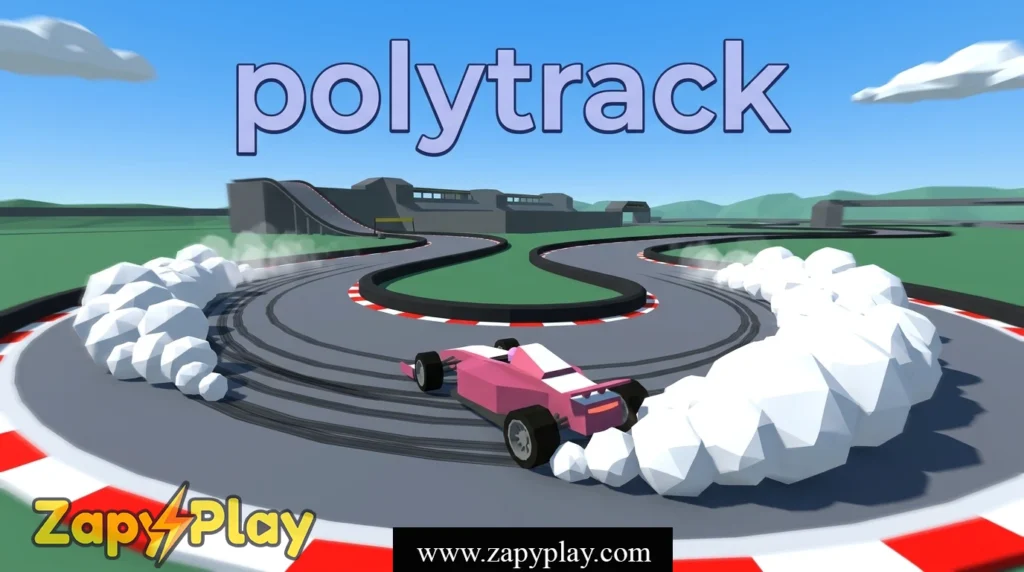
Polytrack is a browser-based racing game developed by Kodub that puts players in control of a low-poly car navigating through cleverly designed obstacle courses and time-trial tracks. The core gameplay loop is simple but deeply addictive: drive from start to finish as fast as possible, shave milliseconds off your time, and compete for the best result on the leaderboard. What sets it apart from other arcade racers is its built-in track editor, which lets players design, share, and race on fully custom maps created by the community.
Kodub released Polytrack as a free-to-play title, and it quickly gained traction among browser game enthusiasts who appreciated its clean aesthetic and surprisingly deep physics. The game runs entirely in your browser without requiring any installation, making it instantly accessible. Its low-poly visual style is not just a stylistic choice — it keeps performance smooth even on modest hardware.
Why You’ll Love Playing Polytrack Online
Top Benefits of Playing Online
One of the biggest draws of Polytrack is that it is completely free to play online, with no account needed and no paywall blocking the core experience. The game is available as Polytrack unblocked on a variety of platforms, meaning students and office workers can enjoy a quick race session even in restricted network environments. Whether you are on a school Chromebook or a home desktop, the game loads fast and runs reliably.
Cross-platform support is another major advantage. The game works on desktop browsers and even holds up reasonably well on mobile, though a keyboard gives you the most precise control during a race. Players looking for a cool way to kill time between tasks will find that a single run takes under 2 minutes, making it ideal for short breaks.
The online leaderboard system adds a competitive layer that keeps sessions from feeling stale. Chasing a world record time on a particularly tricky dirt section of a track is genuinely thrilling, and the community constantly pushes the best times lower and lower. If you enjoy competitive time-trial games, you might also like Planet Clicker for a different kind of satisfying progression loop.
Game Features
Key Features & Mechanics
- Custom Track Editor: The built-in editor lets you build a custom map from scratch using a simple drag-and-place interface, and finished tracks can be shared via a generated code that other players enter to load your creation instantly.
- Time-Trial Racing: Every race is a solo time-trial where your goal is to beat your personal best and climb the global leaderboard — ghost cars from top runs can appear on screen so you always have a pacer to race against.
- No Download Required: Polytrack runs entirely in HTML5 inside your browser, so there is no download and no installation — just open the site and start driving.
- Unblocked Access: The game is widely available in unblocked form on Google Sites and similar hosting platforms, making it one of the most classroom-accessible racing titles available online.
- Community Leaderboards: The gg leaderboard at polytrack.gg tracks the fastest times globally, and the WR for each official track is fiercely contested, with top players regularly posting replays to prove their results.
- Lightweight Performance: The low-poly engine means the game runs at a smooth frame rate even on older machines, and the 6x speed replay feature lets you review your run in fast-forward to spot mistakes instantly.
How Polytrack Compares to Similar Racing, Driving, Arcade, Action Games
Genre Comparisons & Differences
Compared to mainstream browser racers that focus on lap-based circuit racing with AI opponents, Polytrack leans fully into the time-trial format pioneered by games like TrackMania. The absence of AI competitors removes frustration and keeps the focus on self-improvement, which is a design philosophy that rewards patience and repetition. That said, Polytrack’s custom track sharing system gives it a community dimension that many similar titles completely lack.
Where some arcade driving games rely on elaborate car upgrade systems to hold player interest, Polytrack keeps the car handling identical for everyone — your skill with the track, not your loadout, determines your time. This levels the playing field in a refreshing way. The dirt physics in particular feel more nuanced than you would expect from a free browser game, requiring genuine technique to maintain speed through loose-surface corners.
Session length is another area where Polytrack stands out. Most runs last between 1 and 3 minutes, which is shorter than the average level in comparable action-driving titles, making it easy to fit a race into any gap in your day without committing to a long play session.
Game Modes
Time Trial Mode
Time Trial is the heart of Polytrack. You select an official track — ranging from smooth asphalt circuits to rough dirt courses — and race against the clock to post the fastest possible time. The game records your best result and displays it alongside the current world record so you always know exactly how far you are from the top. Ghost replays are visible during your run, letting you see precisely where the WR holder gains their advantage.
Custom Track Mode
In Custom Track mode, players load a community-made map using a share code and race it just like an official stage. The best custom maps rival the quality of the built-in content, and the Polytrack community on GitHub and Reddit regularly curates lists of the top user-created tracks. Some creators have built elaborate themed courses — summer beach circuits, horse ranch hairpins, and even a track styled around a pizza delivery route through a fictional town.
Track Builder Mode
Track Builder is where creativity takes center stage. You place road tiles, dirt sections, jumps, and checkpoints on a 2D grid map to construct your own racing stage. Once complete, the game generates a shareable code that anyone can use to load your track on their own instance of the game. It is important to plan your checkpoint placement carefully — poorly spaced checkpoints can make a track frustrating rather than fun.
Tips & Tricks to Win at Polytrack
Proven Strategies & Pro Tips
- Brake early into tight corners. The car in Polytrack has genuine momentum physics, and braking too late scrubs more time than a cautious early brake does. On sections like the sharp hairpin found in the Fairview or Greyville-inspired community tracks, shaving speed before the apex is always faster than sliding through it.
- Use the 6x replay to audit every run. After finishing a race, watch your replay at 6x speed to identify the 2 or 3 corners where you lose the most time compared to the world record ghost. Fixing one bad corner per session compounds into major improvements over multiple attempts.
- Memorize the track layout before going fast. On your first 3 to 4 runs of any new map, focus purely on learning the route rather than chasing a fast time. Surprises mid-run force panic braking, which is the single biggest time-killer for new players.
- Treat dirt sections differently from asphalt. The dirt surface in Polytrack reduces grip noticeably, so approach these segments with a higher entry speed but gentler steering inputs. Overcorrecting on dirt causes the car to fishtail, which adds anywhere from 0.5 to 2 full seconds to your lap time.
- Share and race community codes for practice variety. Loading a wide range of custom track codes exposes you to corner types and rhythm sections you would not encounter on official maps alone. Players who only run the same 5 official tracks often develop blind spots in their driving technique that community maps quickly reveal.
Who Is Polytrack For?
Target Audience & Player Fit
Polytrack is an ideal game for casual players who enjoy a quick, satisfying challenge without needing to invest hours learning complex systems. The core mechanic is immediately understandable — drive fast, don’t crash — but the skill ceiling is high enough to keep competitive players engaged for months. Students looking for an unblocked game to play during a free period in the classroom will find it especially accessible.
Time-trial enthusiasts and speedrunning fans will feel right at home chasing the best date-stamped WR times on the global board. The game also appeals strongly to creative players who enjoy the track-building side as much as the racing itself. Ages 10 and up will find the difficulty curve approachable, while veteran sim-racing fans will appreciate the surprisingly genuine handling model underneath the arcade exterior.
Why Polytrack Is One of the Best Free Online Games to Play
Final Verdict & Recommendation
From a design standpoint, Polytrack nails the core loop of browser racing: instant loading, tight controls, and a feedback system that makes every improvement feel earned. The decision to include a track editor in a free browser game is genuinely generous and sets it far above the competition in terms of long-term value. The low-poly aesthetic is not just charming — it is a smart engineering choice that ensures the game runs well everywhere.
Accessibility is arguably Polytrack’s greatest strength. Because it runs in HTML5 with no download and no sign-in requirement, it is available on virtually every device with a modern browser, and the unblocked versions hosted on Google Sites mean it reaches players who cannot access typical gaming portals. The community that has grown around Kodub’s Polytrack — posting WR replays, sharing custom track codes, and debating the best racing lines on forums — gives the game a social dimension that most free browser titles never achieve.
If you are looking for a free online racing game that rewards both creativity and raw driving skill, Polytrack is essential. Fire it up, pick a track, and see how close you can get to the world record on your very first session.
Frequently Asked Questions About Polytrack
What is Polytrack and who made it?
Polytrack is a free browser-based time-trial racing game created by the independent developer Kodub. It features official tracks, a custom map editor, and global leaderboards, all playable directly in your browser without any download or account required.
How do I play Polytrack unblocked at school or work?
The game is widely hosted on Google Sites and similar platforms in unblocked form, making it accessible even on networks that restrict standard gaming sites. Searching for Polytrack unblocked will surface several reliable hosting options that load the full game experience without any blocked content.
Is the Polytrack itch.io download safe?
Yes, the Polytrack listing on itch.io is an official release by Kodub, and downloading from that page is considered safe. It is always important to download only from the official itch.io page or the developer’s GitHub repository to avoid unofficial versions that may have been modified.
Where can I find the Polytrack GitHub source or community resources?
The Polytrack GitHub page hosted by Kodub contains the source code and version history for the game, and it is a reliable backup reference if the main site experiences downtime. The GitHub repository is also where many community contributors discuss track design ideas and report bugs directly to the developer.
What is polytrack.gg and how does the WR leaderboard work?
Polytrack.gg is the community hub where players submit and view world record times for every official track in the game. Each entry on the leaderboard includes a replay link, a timestamp for the record date, and the player’s username, so anyone can watch exactly how the best times are achieved and use that information to improve their own race results.
Can I play Polytrack on iOS or mobile devices?
Polytrack can be loaded on iOS and Android browsers since it runs in HTML5, but the experience is best on a device with a physical keyboard. Touch controls are functional for casual play, though competitive players chasing top leaderboard results will find precision significantly easier with keyboard input on a desktop or laptop.
You May Also Like
Check out these awesome games from our collection:
🎮 How to Play
Open the Game
Navigate to the Polytrack website or any unblocked hosting page and click Play — no download or account is needed since the game runs entirely in your browser.
Choose a Track
Select one of the official time-trial tracks from the main menu, or enter a community share code to load a custom map created by another player.
Start Your Run
Press the accelerate key to begin and guide your low-poly car through every checkpoint as quickly as possible, using the brake to control speed in tight corners.
Review Your Replay
After crossing the finish line, watch your replay — optionally at 6x speed — to identify corners where you lost time compared to the ghost or world record pace.
Beat Your Best Time
Restart immediately and apply what you learned from the replay to shave fractions of a second off your time, gradually climbing the global leaderboard.
⌨️ Keyboard Controls
⚡ Pro Tips
- Brake before the corner, not during it — releasing the brake at the apex lets the car accelerate out smoothly and saves significant time over a full lap.
- Watch the world record ghost on every run and focus on matching its line through the first 3 corners before worrying about the rest of the track.
- On dirt sections, use smaller steering inputs than you think you need — the reduced grip amplifies any overcorrection and causes costly fishtails.
- Use the track builder to practice specific corner types you struggle with by recreating them in isolation and drilling them until they feel natural.
- If you are chasing a top leaderboard result, run the track at least 10 times before attempting a serious record effort so the layout is fully memorized.